Public Mobile Referral Code Not Working: Every Cause and Fix
The 30-second diagnosis
Match what you’re seeing to the fix below:
| What you’re seeing | Most likely cause | Go to |
|---|---|---|
| ”Invalid code” error | Code is in the Promo box, or a typo | Fixes 1–2 |
| Field won’t accept typing, or the code won’t “add” | Checkout glitch | Fix 3 |
| No referral field anywhere on the page | You’ve landed on Koodo, not Public Mobile | Fix 4 |
| Code rejected, but it’s typed correctly | Referrer’s account is no longer active | Fix 5 |
| You already paid without entering it | Too late for the field — not too late overall | Fix 6 |
And if nothing on this page works, skip to the support ticket fix. It resolves every one of these.
Fix 1: You’re probably in the wrong box
This is the single most common cause, and it has confused people for years. At Step 4 (Payment) of Public Mobile’s online activation there are two separate fields side by side:
- Promo code — for plan offers like the 10GB data promo (PMDATA10, which ended June 26, 2026)
- Referral Code — for the 6-character referral code that gets you the $10 credit
Put a referral code in the Promo box and you’ll get an “invalid code” error, because the system checks it against a completely different list. It’s a well-documented mix-up on the official forum.
Here are the two fields on the actual Payment page (our own capture, July 2026) — note the applied code shows as a chip below the Referral Code box:
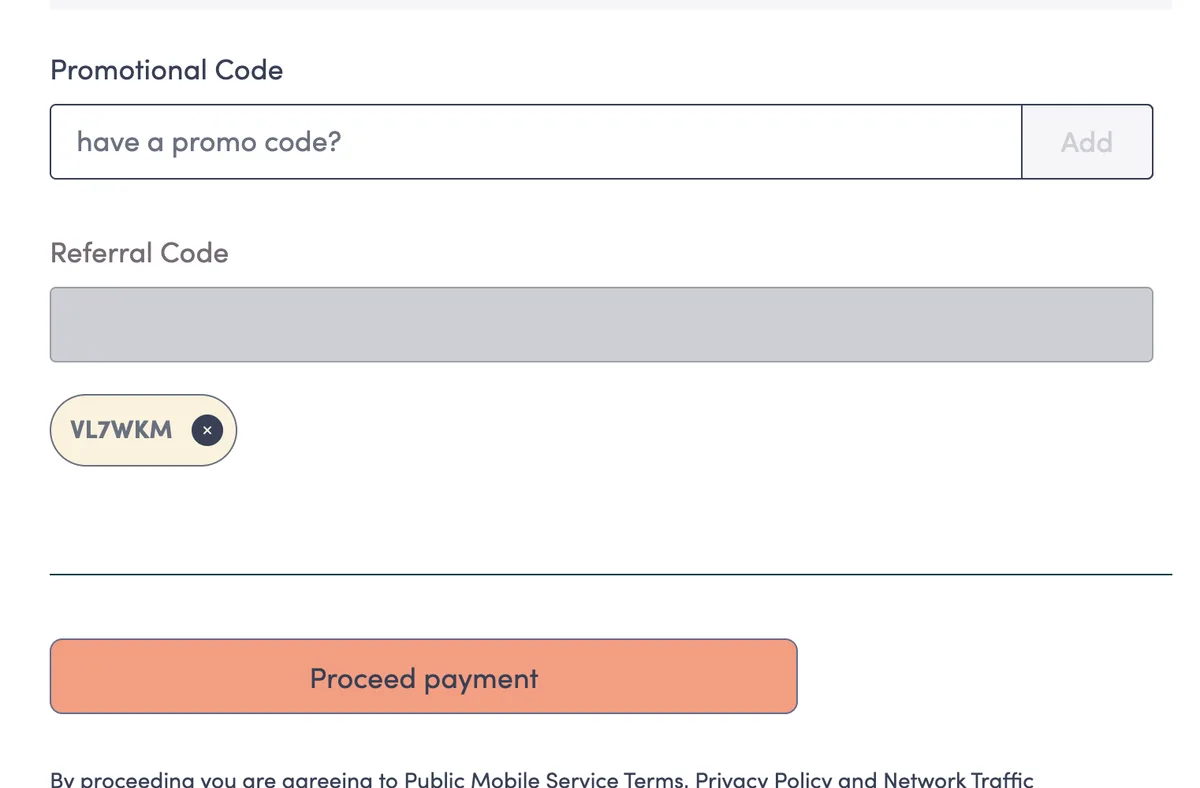
Two things worth knowing:
- The fields stack. You can enter a promo code AND a referral code on the same activation. Using one doesn’t block the other. Our promo code guide explains the difference in detail.
- You don’t need a promo code at all for the referral credit. The $10 applies on any plan, with no minimum.
If you want the exact click-by-click path through checkout, see how to use a referral code.
Fix 2: Check the code itself
Referral codes are exactly 6 characters, letters and numbers. Most rejections that aren’t a wrong-box problem come down to:
- Look-alike characters — the number 0 vs the letter O, the number 1 vs the letters I and l. If you got the code from a screenshot or handwriting, retype it carefully.
- Stray spaces — copying and pasting often grabs an invisible space before or after the code. Delete and retype the first and last character if you’re not sure.
- Case — codes are displayed in capital letters, so enter them in capitals to be safe.
The easiest way to sidestep typos entirely is to use a referral link instead of typing. Referral links look like publicmobile.ca/en/{province}/plans?referral=CODE and pre-fill the code at checkout automatically. The referral code on this page works this way — open the Public Mobile plans page with the code pre-applied. One caveat: your browser needs cookies enabled for the pre-fill to survive to the payment step.
Fix 3: The field won’t accept input (checkout glitch)
Sometimes the Referral Code field simply misbehaves: it won’t take typing, the “Add” button does nothing, or — worst case — the code appears to apply but silently fails to register. Forum members have reported versions of this glitch for years, on both the website and the app.
Work through these in order; one of them almost always gets the field working:
- Refresh the page and re-enter the code.
- Try a private/incognito window — this rules out stale cookies and cached scripts.
- Turn off browser extensions, especially ad blockers and privacy tools, which can block the script that validates the code.
- Switch browsers (Chrome ↔ Safari ↔ Firefox ↔ Edge).
- Switch devices — if you started on your phone, try a desktop, or vice versa.
- Clear cookies for publicmobile.ca, then start checkout again (remember cookies must stay enabled).
One more habit worth adopting: screenshot the payment page showing the referral code applied, before you pay. Long-time forum members recommend this because of the silent-failure glitch — if the credit never shows up, a screenshot makes your support ticket an open-and-shut case.
Fix 4: You’re on Koodo, not Public Mobile
This is the big 2026 trap. TELUS (which owns both brands) now runs “Fast Switch” Koodo ads inside Public Mobile’s own signup and login flow. Referred friends have clicked one of these ads mid-signup and ended up completing a Koodo order — where Public Mobile referral codes don’t exist and don’t work. Real customers have reported exactly this on the official forum.
Before you hunt for the referral field, check your address bar. It must say publicmobile.ca. If it says koodomobile.com, back out and start again on Public Mobile’s site — or use this link straight to the Public Mobile plans page, which keeps you (and the code) in the right place. If you already activated on Koodo by accident, the referral credit can’t be recovered there; you’d need to be a new Public Mobile activation for it to apply.
Fix 5: The referrer’s account is no longer active
Referral codes never expire while the owner’s account is active — but that’s the catch. If the person who gave you the code suspended their service, was deactivated for non-payment, or left Public Mobile, their code stops working immediately.
The fix is simple: use a different active code. Every valid code gives the identical $10 credit — there’s no such thing as a “better” code — so nothing is lost by switching. The referral code on this page belongs to an active account (here’s how we verify that), and you can see the current standard offer, with no inflated numbers, on our current offer page.
Fix 6: You already paid — the field is gone
Once you complete Step 4 and pay, the Referral Code field is gone for good. There is no place in My Account to add a code yourself after activation, and waiting won’t make one appear.
But the credit is not lost. Community guidance is blunt about this — after payment “that would be too late” for the field — yet Public Mobile’s own support agents fix it every week. That’s the next section.
The fix that always works: a support ticket
Whatever went wrong — glitchy field, wrong box, forgot entirely — the fallback is the same, and it comes straight from Public Mobile staff. In December 2025, the official CSA_PM account confirmed on the community forum: open a ticket and an agent will add the code manually.
The agent needs exactly three things:
- The referrer’s name
- The referrer’s phone number
- The referral code
How to submit the ticket (remember: Public Mobile has no phone line and no stores):
- Chatbot route: open the chat assistant on publicmobile.ca, ask to “submit a ticket to an agent,” and include all three details plus your activation date in your first message.
- Forum route: if you can’t sign in to the chatbot, send a private message to the CS_Agent account on the official community forum with the same details.
Be aware of one honest caveat: the program’s fine print technically says referral credits “will not be awarded for past activations,” so the manual add is at the agent’s discretion. In practice, agents apply it routinely — but file the ticket within days of activating, keep the message polite, and attach a screenshot of checkout if you have one. Our add-a-code-after-activation guide walks through the whole process with a copy-paste message template.
How to know it finally worked
Once the code is applied — at checkout or by an agent — here’s what to expect:
- You (the new customer): a one-time $10 credit appears in your account within 72 hours of activation. It’s a payment credit, not a plan discount, so look under your available funds rather than at the plan price.
- The referrer: starts earning 1 Public Point every 30 days you stay a customer (1 point = $1 when redeemed), with no cap and no end date.
If 72 hours pass and there’s no credit, don’t wait longer — open the ticket described above with the same three details. And for everything else that happens in your first days as a customer, see after you activate.
One last honesty note, since other referral sites muddy this: as of July 13, 2026 there is no bonus promotion running — the standard credit is $10, on any plan. Anything promising $25 is quoting promos that ended in 2025. The full history is on our 2026 referral code page.
Frequently asked questions
Why does Public Mobile say my referral code is invalid?
Usually because it was typed into the Promo code box instead of the Referral Code box — they are two separate fields at Step 4 of checkout. If it's in the right box, check for typos (0 vs O, 1 vs I) and stray spaces, or try another active code — every valid code gives the same $10.
Can I add a referral code after I've already activated?
Yes. Public Mobile staff have confirmed that a support agent can add it manually if you open a ticket with the referrer's name, phone number, and the code. See our step-by-step ticket guide.
Is a referral code the same as a promo code?
No. They go in two different fields at the payment step, and you can use both at once — they stack. A referral code gives you the $10 credit; a promo code changes the plan offer itself. More in our promo code guide.
Do Public Mobile referral codes expire?
No. A code stays valid for as long as the referrer's account is active, and unlimited new customers can use it. If a code is rejected, the owner's account may have closed — just use a different active code, like the one on this page.
How long does the $10 referral credit take to show up?
The one-time $10 credit is applied to your account within 72 hours of activation. If nothing appears after 72 hours, open a support ticket with the referrer's name, phone number, and the code — see what happens after you activate.
Why can't I find the referral code field at checkout?
It only appears at Step 4 (Payment) of activation, next to the Promo code field. If there's no referral field anywhere, check your address bar — TELUS shows Koodo 'Fast Switch' ads inside the Public Mobile signup flow, and Koodo's checkout has no referral field. Go back to publicmobile.ca.
Can I call Public Mobile to fix a referral code problem?
No — Public Mobile has no phone support and no stores. Use the chatbot on publicmobile.ca to submit a support ticket, or send a private message to the CS_Agent account on the official community forum.