How to Use a Public Mobile Referral Code
- Check that your phone works with Public Mobile Public Mobile is bring-your-own-phone. Your phone must be unlocked (every phone sold in Canada since December 2017 is), and you can confirm compatibility with the checker on publicmobile.ca. Public Mobile runs on the TELUS network.
- Pick a plan — any plan qualifies The $10 referral credit applies on every plan, from the $22 talk and text plan to the $50/150GB 5G plan. There is no minimum spend for the standard credit.
- Start activation on publicmobile.ca and stay there Create your account and begin the online activation. Ignore any Fast Switch ads for Koodo that appear inside the signup flow — referral codes do not work on Koodo, and people have lost the credit by drifting over.
- Enter the code at Step 4 (Payment) in the Referral Code field On the Payment step, find the field labelled Referral Code — it is separate from the Promo code field beside it, and you can use both. Type the 6-character code, confirm it's applied, and only then pay.
- Finish activation with an eSIM or a physical SIM An eSIM activates in minutes and is advertised at $0 in 2026. A physical SIM costs about $10 at Walmart or Amazon. Either way, the referral code is entered during the online checkout, not on the SIM itself.
- Wait for your $10 credit — it arrives within 72 hours The one-time $10 credit is applied to your account automatically within 72 hours of activation. It offsets your future payments; it does not show as an instant discount at checkout.
The short version
You enter a Public Mobile referral code during online activation, at Step 4 (Payment) of the checkout, in the field labelled Referral Code. It’s a separate box from the Promo code field, and you can fill in both — they stack. Add the code before you pay, finish activating, and a one-time $10 credit lands on your account within 72 hours.
That’s the whole trick. The rest of this page walks through each step, including the two places where people most often lose the credit: paying before entering the code, and getting sidetracked onto Koodo by ads inside the signup flow.
One honest note first: every valid referral code gives you exactly the same $10. There is no “best” code and no secret bigger one — sites promising “up to $25” are quoting bonus promos that ended in 2025. No bonus promo is running as of July 2026; see the current offer for what’s live. The referral code on this page works like any other — using it simply supports this site, at no cost to you.
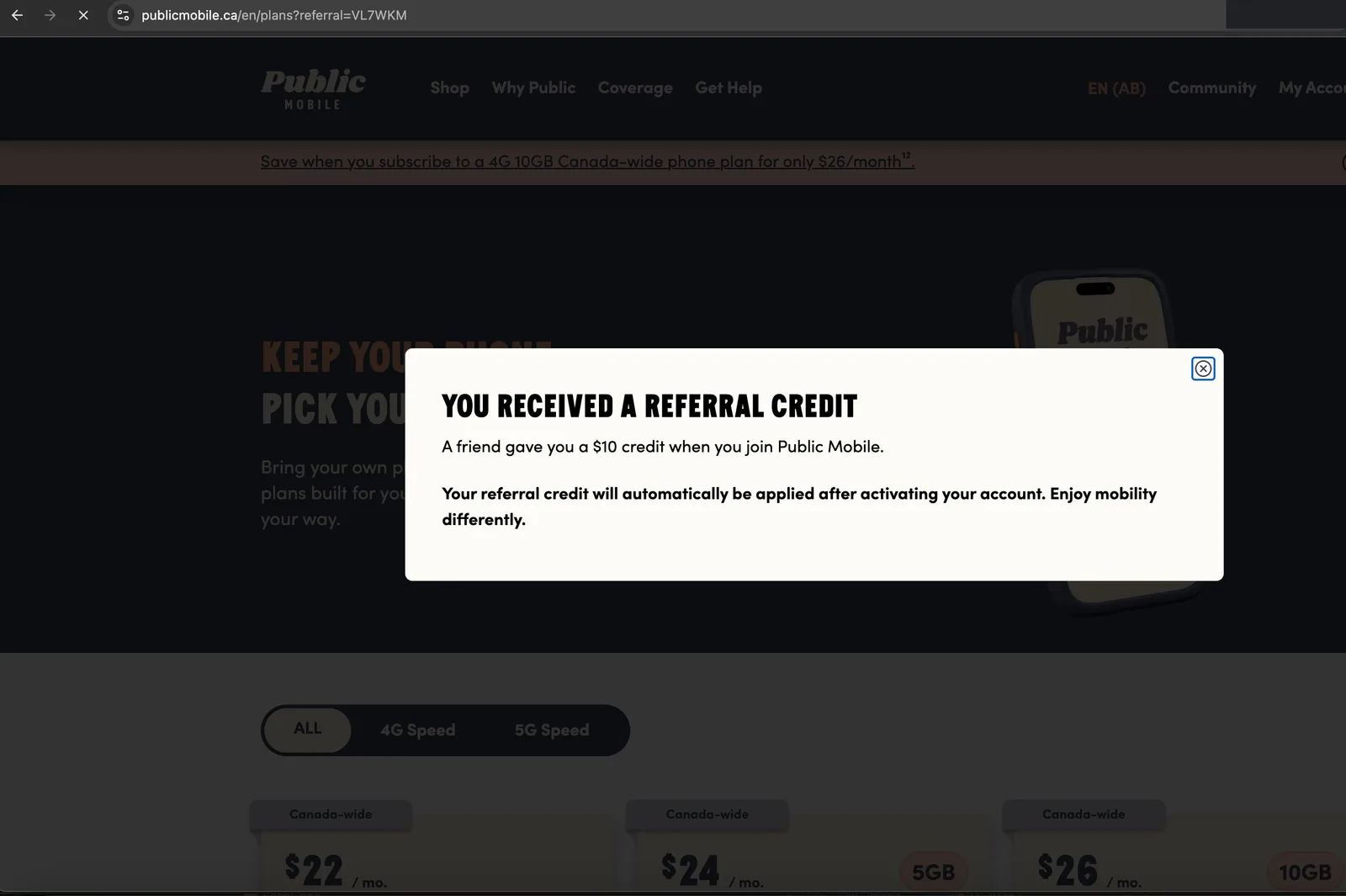
Every screenshot on this page was captured by us on July 14, 2026, during a real activation run — not stock images or mock-ups. Here’s what opening the referral link looks like the moment you arrive:
What you’ll need
- An unlocked phone (bring-your-own-phone is the only option — Public Mobile doesn’t sell phones)
- A credit card or Visa Debit for the first payment
- Your account number and transfer PIN from your current carrier, if you’re keeping your number — our switching guide explains where to find them
- A referral code — the one shown on this page, or one from a friend you know
Step 1: Check that your phone is compatible
Public Mobile runs on the TELUS network, so almost any modern unlocked phone works. Every phone sold in Canada since December 2017 is unlocked by law. The activation flow on publicmobile.ca starts with a compatibility check — pick your phone’s make and model and it confirms whether 4G or 5G plans will work. If you want an eSIM (the fastest route), your phone also needs eSIM support — most phones from 2018 onward have it. Details in our eSIM guide.
Step 2: Pick a plan — any plan qualifies
The standard $10 referral credit applies on any plan. As of July 2026 the lineup runs from a $22 talk-and-text plan through 4G tiers at $24/5GB, $26/10GB and $30/35GB, up to 5G tiers from $35/50GB to $50/150GB (top tiers include Canada-US-Mexico coverage) — but Public Mobile changes its lineup almost monthly and labels everything “limited time,” so check our plans page for what’s current.
There’s no minimum spend for the referral credit. Some past promos required a $29+ or $35+ plan for bonus credits, but those promos have ended; the base $10 has never had a plan requirement.
Tip: if you open Public Mobile through this plans link, the referral code on this page is pre-filled for you at checkout, so you can’t misplace it later. (That link supports this site.)
Step 3: Create your account — and stay on publicmobile.ca
During signup you’ll create a Public Mobile account with your email. Straightforward — with one 2026-specific warning.
Since April 2026, TELUS has been showing “Fast Switch” ads for Koodo inside the Public Mobile signup and login flow, and they’re easy to mistake for part of the checkout. People referred to Public Mobile have clicked through and ended up activating on Koodo — where referral codes do not work and the $10 credit doesn’t exist.
Before you enter any payment details, glance at the address bar: it should say publicmobile.ca. If you see Koodo branding, back out and return to the Public Mobile checkout.
Step 4: Enter the code in the “Referral Code” field
This is the step that decides whether you get the $10, so here’s exactly what to look for.
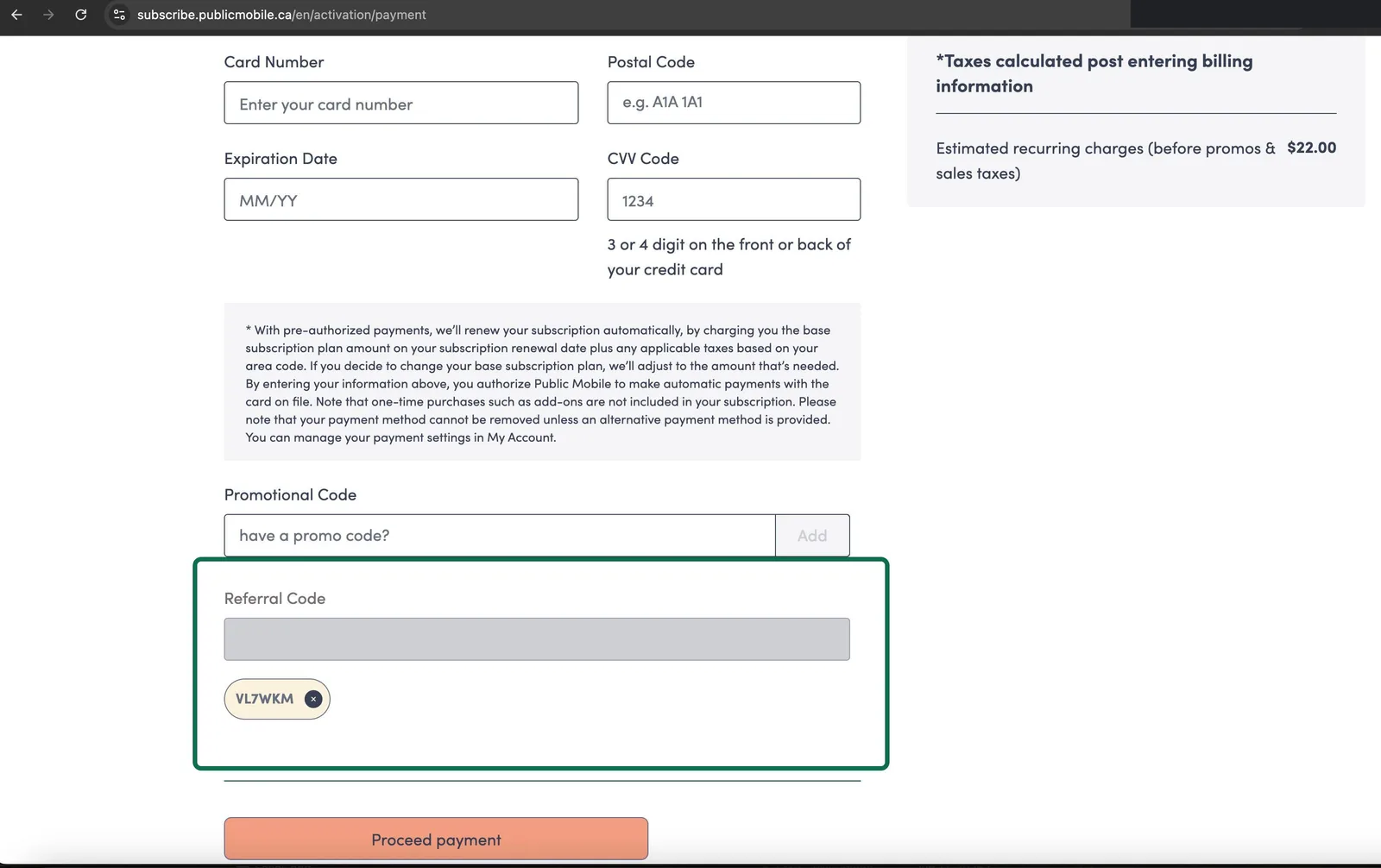
Step 4 of the activation checkout is the Payment page — where you enter your card details. On this page there are two separate code fields:
| Field | What goes in it |
|---|---|
| Referral Code | Your 6-character referral code (the $10 credit) |
| Promo code | Promotional codes for plan discounts, bonus data, etc. |
They are different fields, and mixing them up is the single most common reason a code gets rejected. You can use both at once — a referral code and a promo code stack. If a promo code is available right now, our promo code page lists it.
Here’s the actual Payment page, captured during our July 2026 test activation — the Referral Code field is boxed, with the code applied as a chip below it:
Three things to get right:
- Enter the code before you pay. Once payment goes through, the checkout can’t take the code anymore — you’d need a support ticket to add it after the fact.
- Confirm the code is applied, not just typed. Click the add/apply button and make sure the page acknowledges it.
- Watch for look-alike characters. Codes are 6 letters and numbers, and 0/O or 1/I typos are common. Copy and paste when you can — or use the pre-filled link and skip typing entirely.
It’s also worth taking a screenshot of the Payment page showing the applied code. Community forum threads going back years document a glitch where an entered code occasionally fails to register silently; a screenshot makes the support ticket painless if that happens. If the field rejects your code outright, see the fix guide.
Step 5: Finish activation — eSIM or physical SIM
After payment, you choose how to get connected:
- eSIM — available to everyone since August 2023, and Public Mobile advertised “$0 eSIM and $0 activation” in 2026. You scan a QR code and you’re typically live within minutes. This is the fastest option if your phone supports it.
- Physical SIM — about $10 at Walmart, Amazon, or Public Mobile’s online store. If you order online, you’ll wait a few days for shipping before you can activate.
Either way, the referral code is entered during the online checkout, not on or with the SIM card. If you bought a physical SIM in a store first, you still enter the code at Step 4 when you activate it on publicmobile.ca. Porting a number? Keep your old SIM active until the transfer completes — usually a few hours.
Step 6: Your $10 credit arrives within 72 hours
The credit is not an instant discount at checkout — you pay the full first payment, and the one-time $10 credit is applied to your account within 72 hours of activation. It sits as account credit and reduces what you pay on your next renewal.
You can confirm it in My Account under your payment or transaction history. While you’re there, you’ll also find your own referral code at the top of the page, under the “Sharing is caring” banner — from now on, you earn 1 Public Point (worth $1) every 30 days for each person you refer. See refer a friend for how that side works, and after you activate for a checklist of everything else worth doing in your first week.
If 72 hours pass and no credit appears: don’t panic, and don’t assume it’s lost. Start with the not-working guide. If you never entered a code at all, a support agent can add one retroactively — they’ll need the referrer’s name, phone number, and the code, as confirmed by Public Mobile staff in December 2025. The retroactive guide walks through the ticket.
The five mistakes that cost people the $10
- Putting the code in the Promo code field. The checkout rejects it as invalid. It belongs in Referral Code.
- Paying first, entering the code after. The checkout won’t take it once payment is done — only a support ticket can fix it then.
- Drifting onto Koodo. The Fast Switch ads inside the signup flow lead to Koodo, where referral codes don’t exist. Stay on publicmobile.ca.
- Typos. 0 vs O, 1 vs I. Copy-paste the code or use the pre-filled link.
- Expecting an instant discount. The $10 arrives within 72 hours as account credit — it won’t lower the amount you pay at checkout.
Avoid those five and the process is genuinely simple: check your phone, pick any plan, enter the code in the right field at Step 4, activate, and the $10 shows up on its own.
Frequently asked questions
Where do I enter the Public Mobile referral code?
In the Referral Code field on Step 4 (Payment) of the online activation checkout. It sits near the payment details, beside a separate Promo code field. Add the code before you pay — after payment it's too late without a support ticket.
Can I use a referral code and a promo code at the same time?
Yes. They go in two different fields on the same Payment step and they stack. See our promo code guide for what's currently available.
How much do I get for using a referral code?
A one-time $10 account credit, applied within 72 hours of activation. Every valid code gives exactly the same $10 — there is no bigger or better code.
Does the referral code work on every plan?
Yes. The standard $10 credit applies on any plan, from the $22 talk and text plan up to the $50/150GB 5G plan. Some past promos required a minimum plan, but no promo is running right now.
I forgot to enter the code — can I still get the credit?
Usually, yes. A Public Mobile support agent can add it retroactively through a support ticket. They'll need the referrer's name, phone number, and the code. Full instructions in our retroactive guide.
The checkout says my referral code is invalid — what now?
First, make sure you're in the Referral Code field, not the Promo code field. Then check for look-alike characters (0 vs O, 1 vs I) — codes are 6 characters. If it still fails, our fix guide covers every known cause.